
API testing - PortSwigger Academy
API recon
To start API testing, you first need to find out as much information about the API as possible, to discover its attack surface.
To begin, you should identify API endpoints. There are locations where an API receives requests about a specific resource on its server. For example, consider the following GET request:
GET /api/books HTTP/1.1
Host: example.com
The API endpoint for this request is /api/books. This results in an interaction with the API to retrieve a list of books from a library. Another API endpoint might be, for example, /api/books/mystery, which would retrieve a list mystery books.
Once you have identified the endpoints, you need to determine how to interact with them. This enables you to construct valid HTTP requests to test the API. For example, you should find out information about the following:
The input data the API processes, including both compulsory and optional parameters.
The types of requests the API accepts, including supported HTTP methods and media formats.
Rate limits and authentication mechanisms.
API documentation
APIs are usually documented so that developers know how to use and integrate with them.
Documentation can be in both human-readable and machine-readable forms. Human-readable documentation is designed for developers to understand how to use the API. It may include detailed explanations, examples, and usage scenarios. Machine-readable documentation is designed to be processed by software for automating tasks like API integration and validation. It’s written in structured formats like JSON or XML.
API documentation is often publicly available, particularly if the API is intended for use by external developers. If this is the case, always start your recon by reviewing the documentation.
Discovering API documentation
Even if API documentation isn’t openly available, you may still be able to access it by browsing applications that use the API.
To do this , you can use Burp Scanner to crawl the API. You can also browse applications manually using Burp’s browser. Look for endpoints that may refer to API documentation, for example:
/api/swagger/index.html/openapi.json
If you identify an endpoint for a resource, make sure to investigate the base path. For example, if you identify the resource endpoint /api/swagger/v1/users/123, then you should investigate the following paths:
/api/swagger/v1/api/swagger/api
You can also use a list of common paths to find documentation using Intruder.
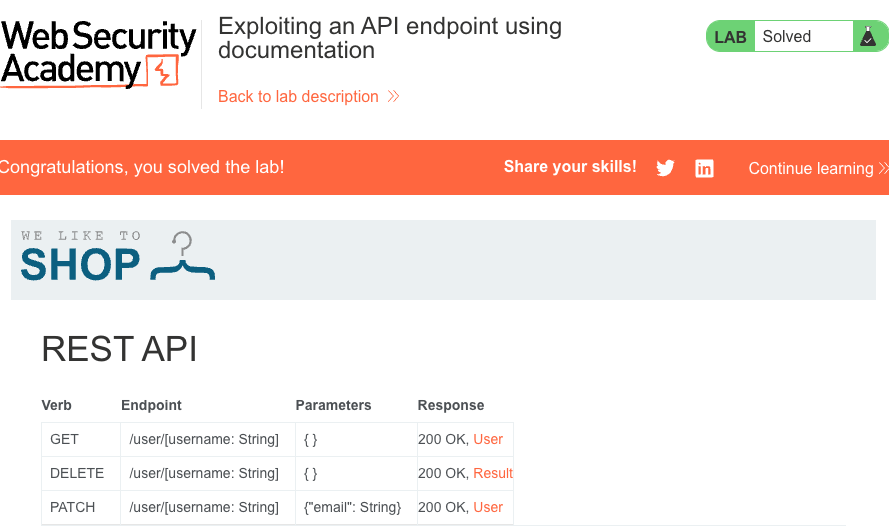
Lab: Exploiting an API endpoint using documentation
To solve the lab, find the exposed API documentation and delete carlos. You can log in to your own account using the following credentials: wiener:peter.
Required knowledge
To solve this lab, you’ll need to know:
What API documentation is.
How API documentation may be useful to an attacker.
How to discover API documentation.
These points are covered in our API Testing Academy topic.
Using machine-readable documentation
You can use a range of automated tools analyze any machine-readable API documentation that you find.
You can use Burp Scanner to crawl and audit OpenAPI documentation, or any other documentation in JSON or YAML format. You can also parse OpenAPI documentation using the OpenAPI Parser BApp.
You may also be able to use specialized tool to test the documented endpoints, such as Postman or SoapUI.
Identifying API endpoints
You can also gather a lot information by browsing applications that use the API. This is often worth doing even if you have access to API documentation, as sometimes documentation may be inaccurate or out of date.
You can use Burp Scanner to crawl the application, then manually investigate interesting attack surface using Burp’s browser.
While browsing the application, look for patterns that suggest API endpoints in the URL structure, such as /api/. Also look out for JavaScript files. These can contain references to API endpoints that you haven’t triggered directly via the web browser. Burp Scanner automatically extracts some endpoints during crawls, but for a more heavyweight extraction, use the JS link Finder BApp. You can also manually review JavaScript files in Burp.
Interacting with API endpoints
Once you’ve identified API endpoints, interact with them using Burp Repeater and Burp Intruder. This enables you to observe the API’s behavior and discover additional attack surface. For example, you could investigate how the API responds to changing the HTTP method and media type.
As you interact with the API endpoints, review error messages and other responses closely. Sometimes these include information that you can use to construct a valid HTTP request.
Identifying supported HTTP methods
The HTTP method specifies the action to be performed on a resource. For example:
GET- Retrieves data from a resourcePATCH- Applies partial changes to a resource.OPTIONS- Retrieves information on the types of request methods that can be used on a resource.
An API endpoint may support different HTTP methods. It’s therefore important to test all potential methods when you’re investigating API endpoints. This may enable you to identify additional endpoint functionality, opening up more attack surface.
For example, the endpoint /api/tasks may support the following methods:
GET /api/tasks- Retrieves a list of tasks.POST /api/tasks- Creates a new task.DELETE /api/tasks/1- Deletes a task.
You can use the built-in HTTP verbs list in Burp Intruder to automatically cycle through a range of methods.
Note
When testing different HTTP methods, target low priority objects. This helps make sure that you avoid unintended consequences, for example altering critical items or creating excessive records.
Identifying supported content types
API endpoints often expect data in specific format. They may therefore behave differently depending on the content type of the data provided in a request. Changing the content type may enable you to:
Trigger errors that disclose useful information.
Bypass flawed defenses.
Take advantage of differences in processing logic. For example, an API may be secure when handling JSON data but susceptible to injection attacks when dealing with XML.
To change the content type, modify the Content-Type header, then reformat the request body accordingly. You can use the Content type converter BApp to automatically convert data submitted within requests between XML and JSON.
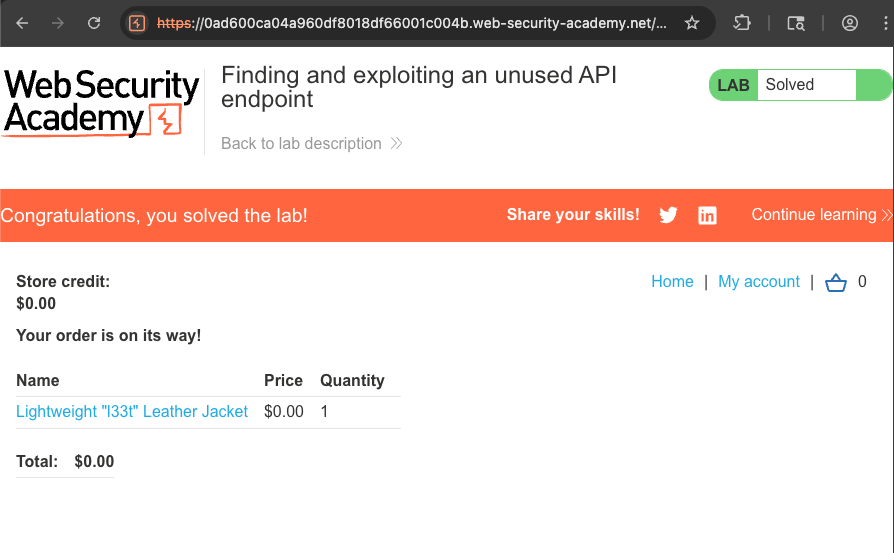
Lab: Finding and exploiting an unused API endpoint
To solve the lab, exploit a hidden API endpoint to buy a Lightweight l33t Leather Jacket. You can log in to your own account using the following credentails: wiener:peter.
Required knowledge
To solve this lab, you’ll need to know:
How to use error messages to construct a valid request.
How HTTP methods are by RESTful APIs.
How changing the HTTP method can reveal additional functionality.
These points are covered in our API Testing Academy topic.
Using Intruder to find hidden endpoints
Once you have identify some initial API endpoints, you can use Intruder to uncover hidden endpoints, you can use Intruder to uncover hidden endpoints. For example, consider a scenario where you have identified the following API endpoint for updating user information:
PUT /api/user/update
To identify hidden endpoints, you could use Burp Intruder to find other resources with the same structure. For example, you could add a payload to the /update position of the path with a list of other common functions, such as delete and add.
When looking for hidden endpoints, use wordlists based on common API naming conventions and industry terms. Make sure you also include terms that are relevant to the application, based on your initial recon.
Finding hidden parameters
When you’re doing API recon, you may find undocumented parameters. that the API supports. You can attempt to use these to change the application’s behavior. Burp includes numerous tools that can help you identify hidden parameters:
Burp Intruder enables you to automatically discover hidden parameters, using a wordlist of common parameter names to replace existing parameters or add new parameters. Make sure you also include names that are relevant to the application, based on your initial recon.
The Param miner BApp enables you to automatically guess up to 65535 param names per request. Param miner automatically guesses names names that are relevant to the application, based on information taken from the scope.
The Content discovery tool enables you to discover content that isn’t linked from visible content that you can browse to, including parameters.
Mass assignment vulnerabilities
Mass assignment (also known as auto-binding) can inadvertently create hidden parameters. It occurs when software frameworks automatically bind request parameters to fields on an internal object. Mass assignment may therefore result in the application supporting parameters that were never intended to be processed by the developer.
Identifying hidden parameters
Since mass assignment creates parameters from object fields, you can often identify these hidden parameters by manually examining objects returned by the API.
For example, consider a PATCH /api/users/ request, which enables users to update their username and email, and includes the following JSON:
{
    "username": "wiener",
    "email": "wiener@example.com",
}
A concurrent GET /api/users/123 request returns the following JSON:
{
    "id" 123,
    "name": "John Doe",
    "email": "john@example.com",
    "isAdmin": "false"
}
This may indicate that he hidden id and isAdmin parameters are bound to the internal user object, alongside the updated username and email parameters.
Testing mass assignment vulnerabilites
To test whether you can modify the enumerated isAdmin parameter value, add it to the PATCH request:
{
    "username": "wiener",
    "email": "wiener@example.com",
    "isAdmin": false,
}
In addition, send a PATCH request with an invalid isAdmin parameter value:
{
    "username": "wiener",
    "email": "wiener@example.com",
    "isAdmin": "foo",
}
If the application behaves differently, this may suggest that the invalid value impacts the query logic, but the valid value doesn’t. This may indicate that the parameter can be successfully updated by the user. You can then send a PATCH request with the isAdmin parameter value set to true, to try and exploit the vulnerability:
{
    "username": "wiener",
    "email": "wiener@example.com",
    "isAdmin": true,
}
If the isAdmin value in the request is bound to the user object without adequate validation and sanitization, the user wiener may be incorrectly granted admin privileges. To determine whether this is the case, browse the application as wiener to see whether you can access admin functionality.
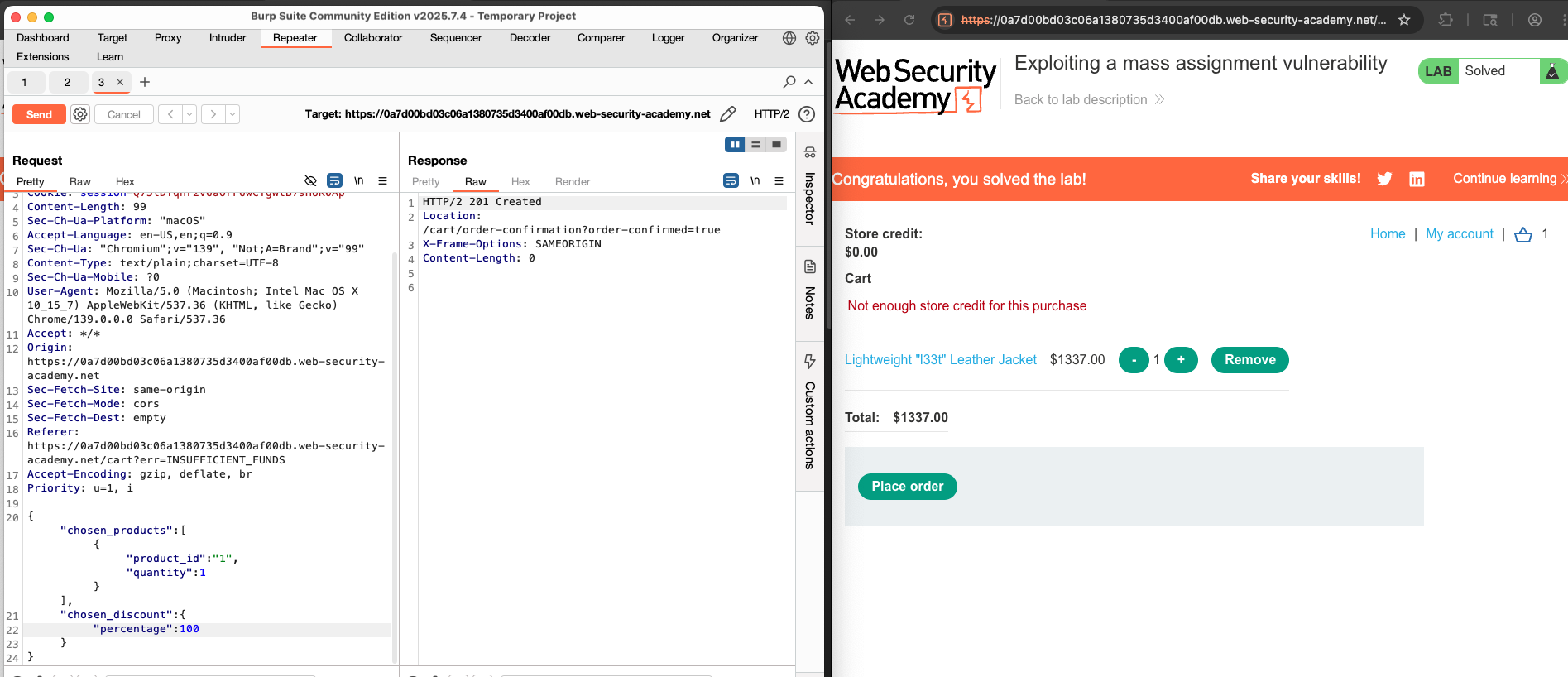
Lab: Exploiting a mass assignment vulnerability
To solve the lab, find and exploit a mass assignment vulnerability to buy a Lightweight l33t Leather Jacket. You can log in to your own account using the following credentials: wiener:peter.
Required knowledge
To solve this lab, you’ll need to know:
What mass assignment is.
Why mass assignment may result in hidden parameters.
How to identify hidden parameters.
How to exploit mass assignment vulnerabilities.
These points are covered in our API Testing Academy topic.
Preventing vulnerabilities in APIs
When designing APIs, make sure that security is a consideration from the beginning. In particular, make sure that you:
Secure your documentation if you don’t intend your API to be publicly accessible.
Ensure your documentation is kept up to date so that legitimate testers have full visibility of the API’s attack surface.
Apply an allowlist of permitted HTTP methods.
Validate that the concept type is expected for each request or response.
Use generic error messages to avoid giving away information that may be useful for an attacker.
Use protective measures on all versions of your API, not just the current production version.
To prevent mass assignment vulnerabilities, allowlist the properties that can be updated by the user, and blocklist sensitive properties that shouldn’t be updated by the user.
Server-side parameter pollution
Some systems contain internal APIs that aren’t directly accessible from the internet. Server-side parameter pollution occurs when a website embeds user input in a server-side request to an internal API without. adequate encoding. This means that an attacker may be able to manipulate or inject parameters, which may enable them to, for example:
Override existing parameters.
Modify the application behavior.
Access unauthorized data.
You can test any usr input. for any kind of parameter pollution. For example, query parameters from fields, headers, and URL path parameters may all be vulnerable.

Note
This vulnerability is sometimes called HTTP parameter pollution. However, this term is also used to refer to a web application firewall (WAF) bypass technique. To avoid confusion, in this topic we’ll only refer to server-side parameter pollution.
In addition, despite the similar name, this vulnerability class has very little in common with server-side prototype pollution.
Testing for server-side parameter pollution in the query string
To test for server-side parameter pollution in the query string, place query syntax characters like #, &, and = in your input and observe how the application responds.
Consider a vulnerable application that enables you to search for other users based on their username. When you search for a user, your browser makes the following request:
GET /userSearch?name=peter&back=/home
To retrieve user information, the server queries an internal API with the following request:
GET /users/search?name=peter&publicProfile=true
Truncanting query strings
You can use a URL encoded # character to attempt to truncate the server-side request. To help you interpret the response, you could also add a string after the # character.
For example, you could modify the query string to the following:
GET /userSearch?name=peter%23foo&back=/home
The font-end will try to access the following URL:
GET /users/search?name=peter#foo&publicProfile=true
Note
It’s essential that you URL-encode the
#character. Otherwise the font-end application will interpret is as a fragment identifier and it won’t be passed to the internal API.
Review the response for clues about whether the query has been truncated. For example, if the response returns the user peter, the server-side query may have been truncated. If an Invalid name error message is returned, the application may have treated foo as part of the username. This suggests that the server-side request may not have been truncated.
If you’re able to. truncate the server-side request, this removes the requirement for the publicProfile field to be set to true. You may be able to exploit this to return non-public user profiles.
Injecting invalid parameters
You can use an URL-encoded & character to attempt to add a second parameter to the server-side request.
For example, you could modify the query string to the following:
GET /userSearch?name=peter%26foo=xyz&back=/home
This results in the following server-side request to the internal API:
GET /users/search?name=peter&foo=xyz&publicProfile=true
Review the response for clues about how the additional parameter is parsed. For example, if the response is unchanged this may indicate that the parameter was successfully injected but ignored by the application.
To build up a more complete picture, you’ll need to test further.
If you’re able to modify the query string, you can then attempt to add a second valid parameter the server-side request.
Related pages
For information on how to identify parameters that you can inject into the query string, see the Finding hidden parameters section.
For example, if you’ve identified the email parameter, you could add it to the query string as follows:
GET /userSearch?name=peter%26email=foo&back=/home
This results in the following server-side request to the internal API:
GET /users/search?name=peter&email=foo&publicProfile=true
Review the response for clues about how the additional parameter is parsed.
Overriding existing parameters
To confirm whether the application is vulnerable to server-side parameter pollution, you could try. to override the original parameter. Do this by injecting a second parameter with the same name.
For example, you could modify the query string to the following:
GET /userSearch?name=peter%26name=carlos&back=/home
This results in the following server-side request to the internal API:
GET /users/search?name=peter&name=carlos&publicProfile=true
The internal API interprets two name parameters. The impact of this depends on how the application processes the second parameter. This varies across different web technologies. For example:
PHP parses the last parameter only. This would result in a user search for
carlos.ASP.NET combines both parameters. This would result in a user search for
peter, carlos, which might result in anInvalid usernameerror message.Node.js / express parses the first parameter only. This would result in a user search for
peter, giving an unchanged result.
If you’ve able to override the original parameter, you may be able to conduct an exploit. For example, you could add name=administrator to the request. This may enable you to log in as the administrator user.
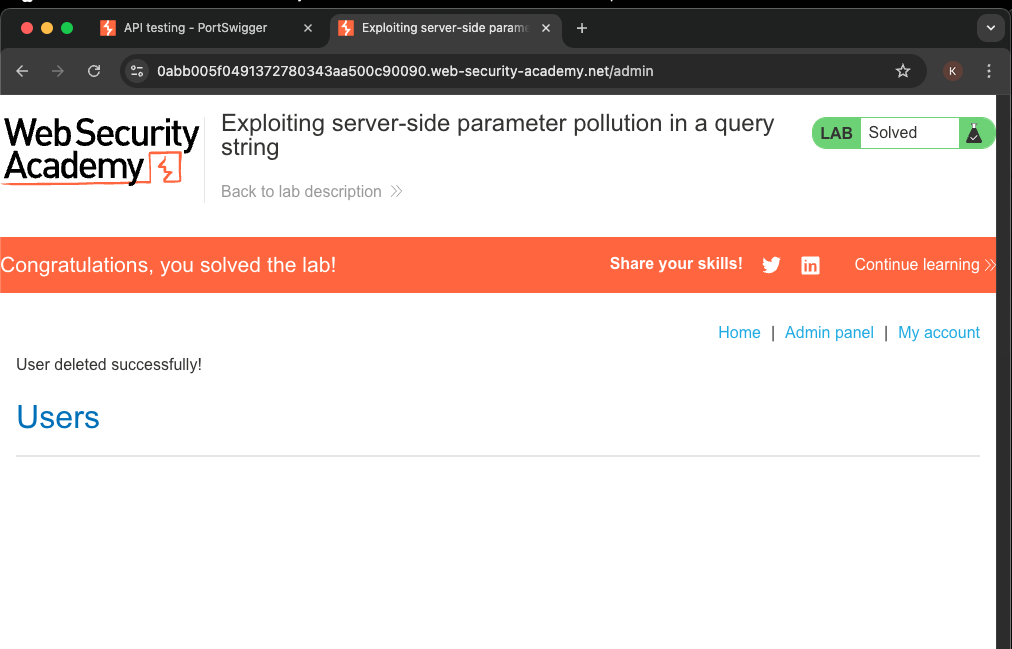
Lab: Exploiting server-side parameter pollution in a query string
To solve the lab, log in as the administrator and delete carlos.
Required knowledge
To solve this lab, you’ll need to know:
How to use URL query syntax to attempt to change a server-side request.
How to use error messages to build an understanding of how a server-side API processes user input.
These points are covered in our API Testing Academy topic.
Testing for server-side parameter pollution in REST paths
A RESTful API may place parameter names and values in the URL path, rather than the query string. For example, consider the following path:
/api/users/123
The URL path might be broken down as follows:
/apiis the root API endpoint./usersrepresents a resource, in this caseusers./123represents a parameter, here an identifier for the specific user.
Consider an application that enables you to edit user profiles based on their username. Requests are sent to the following endpoint:
GET /edit_profile.php?name=peter
This results in the following server-side request:
GET /api/private/users/peter
An attacker may be able to manipulate server-side URL path parameters to exploit the API. To test for this vulnerability, add path traversal sequences to modify parameters and observe how the application responds.
You could submit URL-encoded peter/../admin as the value of the name parameter:
GET /edit_profile.php?name=peter%2f..%2fadmin
This may result in the following server-side request:
GET /api/private/users/../admin
If the server-side client or back-end API normalize this path, it may be resolved to /api/private/users/admin.
Testing for server-side parameter pollution in structured data formats
An attacker may be able to manipulate parameters to exploit vulnerabilities in the server’s processing of other structured data formats, such as a JSON or XML. To test for this, inject unexpected structured data into user inputs and see how the server responds.
Consider an application that enables users to edit their profile, then applies their changes with a request to a server-side API. When you edit your name, your browser makes the following request:
POST /myaccount
name=peter
This results in the following server-side request:
PATCH /users/7312/update
{"name":"peter:}
You can attempt to add the access_level parameter to the request as follows:
POST /myaccount
name=peter","access_level":"administrator
If the user input is added to the server-side JSON data without adequate validation or sanitization, this results in the following server-side request:
PATCH /users/7312/update
{name="peter","access_level":"administrator"}
This may result in the user peter being given administrator access.
Related pages
For information on how to identify parameters that you can inject into query string, see the Finding hidden parameters section.
Consider a similar example, but where the client-side user input is in JSON data. When you edit your name, your browser makes the following request:
POST /myaccount
{"name": "peter"}
This results in the following server-side request:
PATCH /users/7312/update
{"name":"peter"}
You can attempt to add the access_level parameter to the request as follows:
POST /myaccount
{"name": "peter\",\"access_level\":\"administrator"}
If the user is decoded, then added to the server-side JSON data without adequate encoding, this results in the following server-side request:
PATCH /users/7312/update
{"name":"peter","access_level":"administrator"}
Again, this may result in the user peter being given administrator access.
Structured format injection can also occur in responses. For example, this can occur if user input is stored securely in a database, then embedded into a JSON response from a back-end API without adequate encoding. You can usually detect and exploit structured format injection in responses in the same way you can in requests.
Note
This example below is in JSON, but server-side parameter pollution can occur in any structured data format. For an example in XML, see the XInclude attacks section in the XML external entity (XXE) injection topic.
Testing for server-side parameter pollution with automated tools
Testing with automated tools
Burp includes automated tools that can help you detect server-side parameter pollution vulnerabilities.
Burp Scanner automatically detects suspicious input transformations when performing an audit. These occur when an application receives user input, transforms it in some way, then performs further processing on the result. This behavior doesn’t necessarily constitute a vulnerability, so you’ll need to do further testing using the manual techniques outlined above. For more information, see the Suspicious input transformation issue definition.
You can also use the Backslash Powered Scanner BApp to identify server-side injection vulnerabilities. The scanner classifies inputs as boring, interesting, or vulnerable. You’ll need to investigate interesting inputs using the manual techniques outlined above. For more information, see the Backslash Powered Scanning: hunting unknown vulnerability classes whitepaper.
Preventing server-side parameter pollution
To prevent server-side parameter pollution, use an allowlist to define characters that don’t need encoding, and make sure all other user input is encoded before it’s included in a server-side request. You should also make sure that all input adheres to the expected format and structure.
About the author
- Mình thích tìm hiểu công nghệ đặc biệt về lĩnh vực an toàn thông tin. Mình có ghi chú các bài này chủ yếu luyện tiếng Anh và đọc thêm. Cảm ơn mọi người đã quan tâm và đón đọc. Nếu có góp ý gì xin hãy liên lạc với mình nhé!
Comments
Join the discussionNo comments yet. Be the first to comment.